Semantics

Semantic elements are elements with a meaning. Semantic element clearly describe what the element contains both for developer and also for browser.
Examples of non-semantic elements: <div>, <span>
Examples of semantic elements: <article>, <form>, <header>
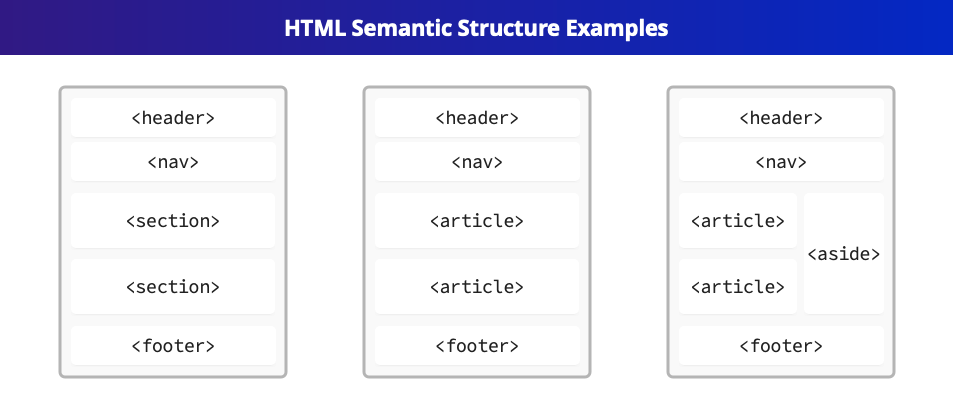
These semantic elements are not required for your website to render in a browser, but as some people might use your website with screen readers, you want to make the code as clean as possible and would be great if your code would be valid HTML5 code, it is highly recommended to use these semantics to define your website.
- Read examples and how to semantically mark your website from here.
- Semrush has really good article about semantics too.
W3C Validator
There is a great service to check that the HTML code you write is correctly written. You can use the W3C Validator service for this task. For the service you can directly paste your HTML code and it will tell you if the code is correctly written and should it need any improvements.
Commonly Used Semantics
Some of the commonly used semantic elements in your website are (click on the elements to read more about them):
| Element | What is it for |
|---|---|
| <header> | Container for introductory content or a set of navigational links. |
| <footer> | Defines a footer for a document or section. |
| <nav> | Contains a set of major navigation links (like header navigation). |
| <main> | Specifies the main content of a document. Should only contain the unique content for the page and should not include sidebars, navigation, site logos and such which is repeated across all pages of a website. |
| <section> | Defines a section in your page. |
| <article> | Defines section in your page for an article. |
| <aside> | Defines some content aside from the content it is placed in. |
| <figure> | Specifies self-contained content, like illustrations, diagrams, photos, code listings... |
| <figcaption> | defines a caption for a <figure> element. |
Note that all of the elements described above on the table can be used multiple times on the same page.
Semantics Exercise 1
Download file semantic_exercise.html from Moodle. This file contains a sample website, which we need to make semantically meaningful. Make the file semantically meaningful.
Hint: You should probably use at least these: article, nav, header, footer.
Semantics Exercise 2
Make the website project that you have created during the course also semantically meaningful.